Add-ons / FluentCart
Available now
Custom Meta Fields for FluentCart
Every field FluentCart doesn’t have. Custom Meta Fields adds extra data to your products and extra questions to your checkout: media, repeaters and conditional checkout fields, with no code.
Free and open source · every feature included · FluentCart 1.6+
FluentCart add-on
At a glance
11
product field types, including media and repeaters
9
checkout field types, including file upload
6
checkout placements that survive AJAX refreshes
0
lines of code to write
What is Custom Meta Fields for FluentCart?
It is a WordPress plugin that adds the two things FluentCart leaves out: extra data on products, and extra questions at checkout. You define each field once, on a settings screen that looks like the rest of the Fluent suite. It then shows up wherever it belongs: the product editor, the checkout form, the order screen, the thank-you page, emails, shortcodes, Elementor widgets and Google’s structured data.
Nothing is hardcoded for one store. The plugin is generic and built on FluentCart’s real data model, verified against FluentCart 1.7 and FluentCart Pro.
Built for stores like yours
- Publishers: ISBN, page count, format, author and publisher, with automatic Book structured data.
- Digital products: preview videos, audio samples, downloadable spec sheets and feature lists.
- Physical goods: materials, dimensions, care instructions and size charts as repeaters.
- Custom orders: engraving text, delivery dates, gift notes and artwork uploads at checkout.
Product fields: which field types can I add?
Unlimited fields, shown on every FluentCart product edit page in a Custom Meta Fields card in the editor sidebar, saved with FluentCart’s own Update button. Each field’s shortcode sits under its label, ready to copy.
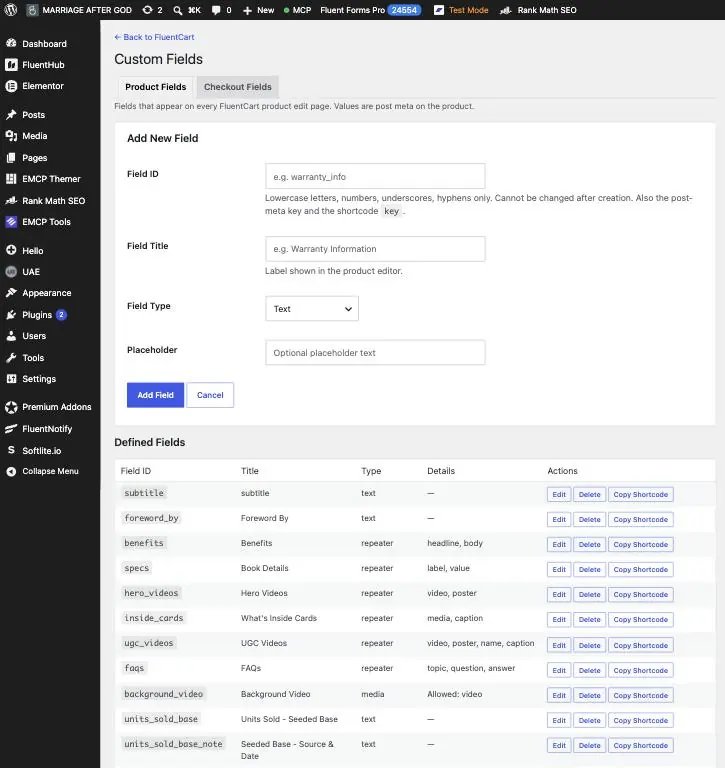
| Field type | Stored as | Details |
|---|---|---|
| Text, Textarea | Text | Placeholder support |
| Number | Validated number | Rejects non-numeric input |
| Select | Text | Comma-separated options; flags a saved value that is no longer an option |
| Checkbox | 1 or 0 | On/off values |
| URL, Email, Date, Color | Text | Validated: real URL or email, YYYY-MM-DD, #rrggbb |
| Media | Attachment ID | The standard WordPress media library, filtered to images, video, audio or files, with preview, Replace and Remove |
| Repeater | Rows | Any of the types above as columns, including media. Add, remove and drag to reorder unlimited rows |
Values are real WordPress post meta, registered with register_post_meta(): typed, available in the REST API, copied when a product is duplicated, and readable by Elementor Pro’s Post Custom Field tag. Delete a field and its values go with it; delete a product and its values are removed automatically.
How do I show product fields on my store?
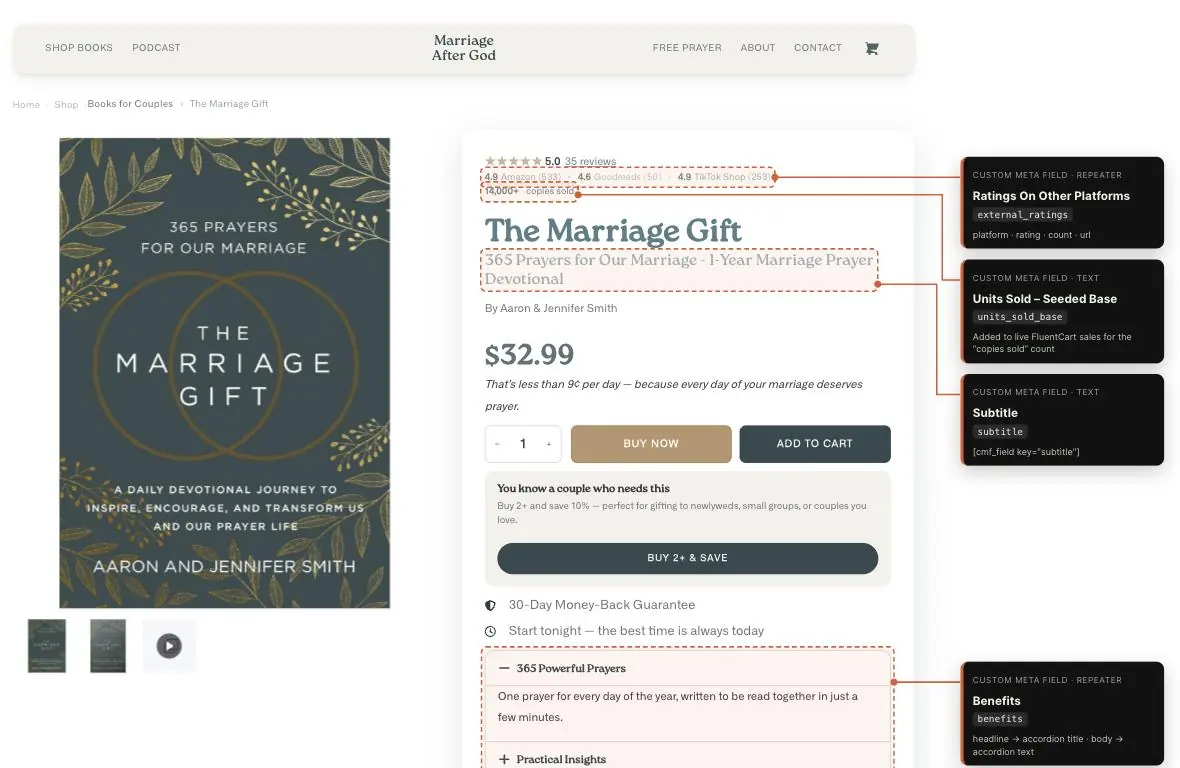
Shortcodes · Free
Anywhere in WordPress
[upfluent_cmf_field key="FIELD_ID"]outputs one value. Media fields: images get responsive srcset at the size you choose, videos a player with poster, audio a player, other files a download link.[upfluent_cmf_field key="FIELD_ID" product_id="123"]shows a product’s field on any page, post or widget area, not only on the product itself.[upfluent_cmf_gtin type="gtin"]prints a product’s GTIN, MPN or brand, with an optional label.[upfluent_cmf_repeater key="FIELD_ID" layout="grid"]outputs repeater rows as a list, a 1–6 column grid, or a swipeable strip.- Empty fields output nothing, and the small stylesheet only loads when a shortcode renders.
Elementor · Free
Two Elementor widgets
- Custom Field: Media picks the right markup from the file itself, with controls for size, link, caption, playback, aspect ratio, border, radius, shadow, filters and hover.
- Custom Field: Repeater loops rows as a list, grid or strip, with sub-field picker, row limit, responsive columns, card styling and typography.
- Both work in Theme Builder templates. A Field dropdown means renaming a field never breaks a published page.
Checkout fields: ask customers anything at checkout
Add your own questions to FluentCart’s checkout. No Fluent Forms needed and no theme edits. Field types: text, textarea, number, select, checkbox, URL, email, date and file upload.

Placement
Six places to put a field
- Before the billing address
- After the shipping address
- Before or after payment methods
- After the place-order button
- In the order summary, under order notes
Every position sits outside the parts FluentCart re-renders, so fields survive address and shipping changes.
Conditional logic
Show a field only when it applies
Match all or any rules based on another checkout field, billing or shipping country and state, ship-to-different-address, payment method, shipping method, business purchase, or create-an-account.
Rules run live in the browser and again on the server, so a hidden field is never required and never saved.
File uploads
Uploads done safely
Set allowed file types and a size limit per field. Files use FluentCart’s own storage: local, Amazon S3 or Cloudflare R2. Scripts and HTML are always refused.
Local files get random names behind a locked folder. Abandoned uploads are cleaned up automatically.
Where do the answers go?
- Order screen: a Checkout Fields card on every order, with image previews and download links for files.
- Thank-you page: an Additional details block after the order items, with a preview of uploaded images.
- Emails:
{{checkout.FIELD_ID}}for one answer or{{checkout.all}}for a table of everything, in every FluentCart notification. - History that stays true: each answer is saved with the field’s label at the time, so renaming or deleting a field never changes an old order.
Checkout fields also appear under FluentCart’s own Settings → Checkout Fields, with the same on/off switch and Required checkbox as the built-in fields. Required is enforced in the browser and on the server, only while the field is visible.
Does it add product schema for Google?
Yes. On every product page it outputs Product, BreadcrumbList and Organization structured data (JSON-LD), read live from your store:
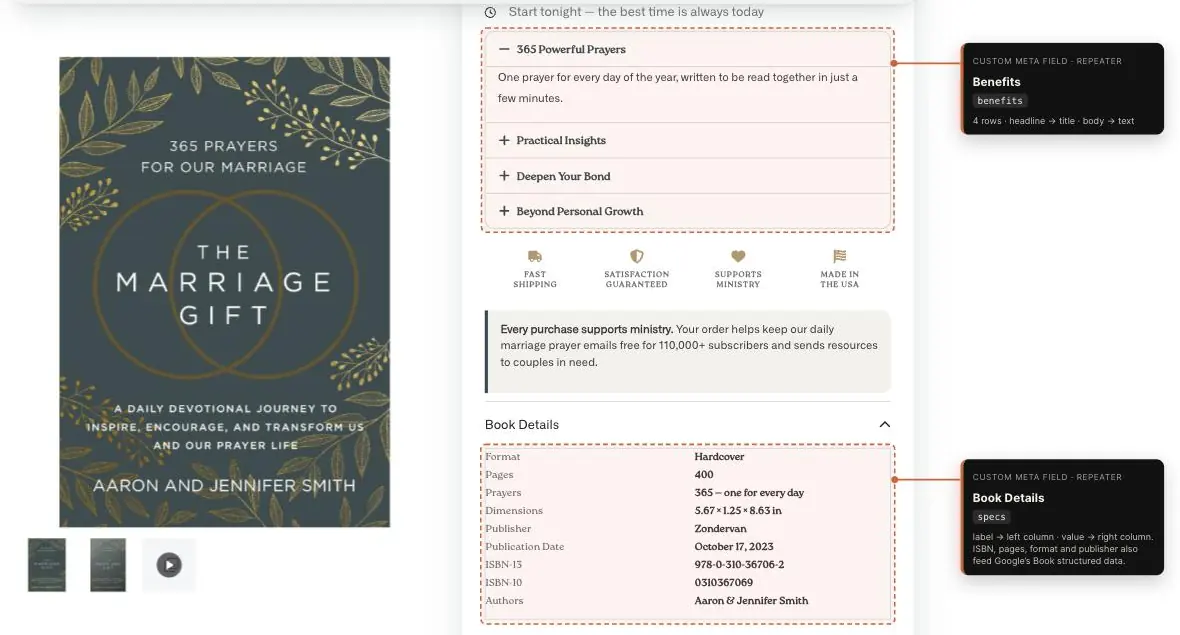
- Prices, SKU and stock from FluentCart variations; currency and address from store settings; images from the featured image and gallery; ratings from WP Social Ninja reviews.
- Automatic Book markup: products with ISBN, page count, format, author, publisher or publish date become a Book with isbn, gtin13, numberOfPages, bookFormat, author, publisher and datePublished. Shared surnames like “Jane & John Doe” are handled.
- Merchant listing details: a configurable return policy and shipping rates read straight from FluentCart’s shipping zones and methods.
- Duplicate Product nodes from other plugins are removed so Google sees exactly one, and Rank Math’s og:type is set to product. Fourteen filters let developers reshape any node.
Built into FluentCart, not bolted on
1
Looks like the Fluent suite
One settings screen with Product Fields and Checkout Fields tabs, built on FluentHub’s design tokens. Cards, tabs, tables and buttons match, and dark mode follows FluentHub and FluentCart.
2
Lives inside FluentHub
With FluentHub’s unified UI on, Custom Fields opens as its own app in the portal sidebar. Without FluentHub it is a normal WordPress admin page, also under FluentCart → More → Custom Fields.
3
Respects shop roles
Permissions follow FluentCart’s role model, including FluentCart Pro shop roles: settings for field definitions, products view/edit for values, orders view for checkout answers.
4
Ready for AI agents
Eight WordPress Abilities (WordPress 6.9+) on FluentCart’s MCP server and any WordPress MCP adapter: list, create, update, delete and reorder fields; get and set product values; read an order’s answers. An AI agent can build your field schema for you.
5
A real developer API
REST API at fct-custom-meta/v1 for field definitions and product values, with cookie or Application Password auth. Filters and actions throughout, from schema nodes to upload storage.
6
Clean data, clean uninstall
Definitions in one non-autoloaded option; values as post meta and order meta. Uninstalling removes everything, including locally stored uploads and scheduled tasks.
Everything is free
Custom Meta Fields started as a free plugin with a paid Pro edition. We decided to make every Pro feature free for everyone: media and repeater fields, the Elementor widgets, checkout fields with conditional logic and file uploads, and GTIN import. There is one plugin, on WordPress.org, with no licence key, no paid tier and no upgrade prompts. It is open source under the GPL.
Already running the Pro edition? Update it once from your WordPress dashboard. The update installs the free plugin, switches itself off and keeps every field, value and checkout answer.
| Feature | Included |
|---|---|
| Product fields: text, textarea, number, select, checkbox, URL, email, date, color | Yes |
| Media and repeater fields | Yes |
| Shortcodes and two Elementor widgets | Yes |
| Checkout fields with six placements and conditional logic | Yes |
| Checkout file uploads (local, Amazon S3, Cloudflare R2) | Yes |
| GTIN and MPN per variation, brand per product | Yes |
| GTIN and MPN import from WooCommerce or CSV | Yes |
| Product, Book, Breadcrumb and Organization structured data | Yes |
| REST API and WordPress Abilities (MCP) | Yes |
| Licence key, paid tier or upgrade prompts | None |
| Updates and support | WordPress.org and upfluent.io/support |
Requirements
- WordPress 5.9+, PHP 7.4+, FluentCart 1.6+
- Works with FluentCart Pro, FluentHub, Elementor 3 and 4, Rank Math and WP Social Ninja
- AI agent abilities need WordPress 6.9+
FAQ
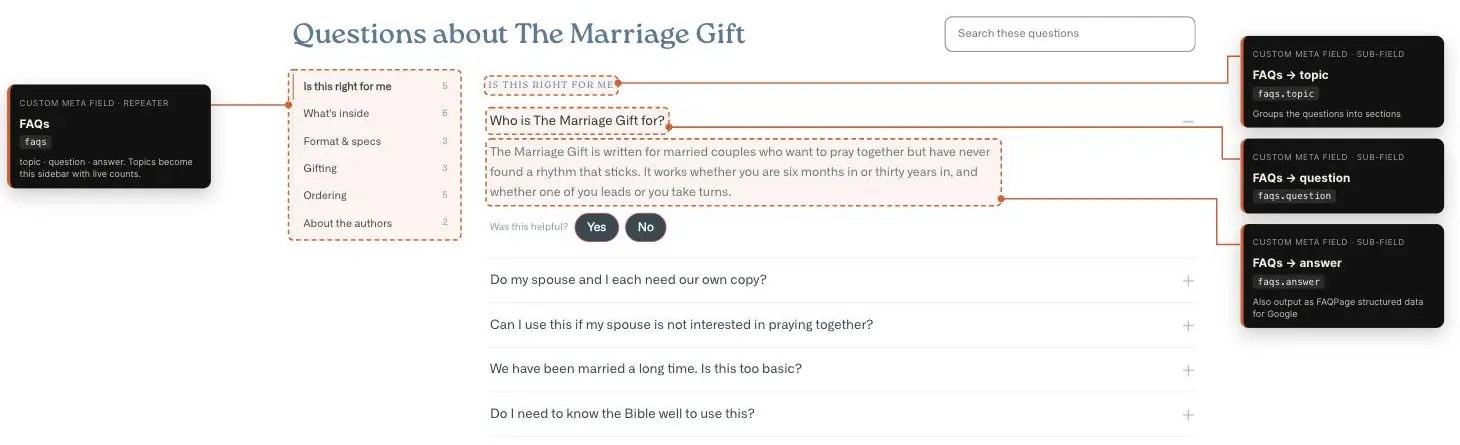
What does Custom Meta Fields for FluentCart do?
It adds custom fields to FluentCart products (text, media, repeaters and more) and custom questions to the FluentCart checkout, then shows them on your product pages, orders, emails and Google structured data. No code needed.
Does FluentCart have custom fields built in?
FluentCart lets you manage its built-in checkout fields, but it has no way to add your own product fields or new checkout questions. This plugin fills that gap and plugs into FluentCart’s own Checkout Fields settings screen.
Can I add conditional checkout fields to FluentCart?
Yes. Show a field only when rules match, such as a country, shipping method, payment method or another field’s answer. Hidden fields are never required and never saved.
Can customers upload files at checkout?
Yes. You set allowed file types and a size limit. Files are stored with FluentCart’s storage driver (local, S3 or R2) and linked from the order screen.
How do I display a custom field on my product page?
Use the shortcode shown under each field in the product editor, for example [upfluent_cmf_field key=”isbn”], or the Elementor widgets. Elementor Pro’s Post Custom Field dynamic tag also works.
Do checkout answers show up in order emails?
Yes. Use {{checkout.FIELD_ID}} for one answer or {{checkout.all}} for all answers in any FluentCart email notification.
Does it help my products show up in Google?
It outputs Product structured data with prices, stock, images, ratings, return policy and shipping rates, plus automatic Book markup for publishers. That is what Google uses for rich results and merchant listings.
Does it work with Elementor?
Yes. It adds Media and Repeater widgets under the FluentCart Fields category, and they work in Theme Builder templates.
Can an AI assistant set up my fields?
Yes. On WordPress 6.9+ the plugin exposes eight abilities to FluentCart’s MCP server and WordPress MCP adapters, so an AI agent can create fields and fill in product values. It also works with All-In-One MCP for Fluent Suite.
Can I add GTIN, MPN and brand to FluentCart products?
Yes. GTIN and MPN are columns next to SKU in FluentCart’s variation table, with check-digit validation and duplicate detection, and the brand is set per product. Coming from WooCommerce? Import your identifiers from WooCommerce or a CSV file.
Is it really all free?
Yes. Every feature that used to be in the Pro edition is in the free plugin: no licence key, no paid tier and no upgrade prompts. It is free and open source under the GPL, and provided as is, without warranty.
I bought the Pro edition. What happens now?
Update Pro once from your WordPress dashboard. The update installs the free plugin from WordPress.org, activates it and switches itself off. Your fields, values and checkout answers stay as they are.
Independent add-on by UpFluent. Not affiliated with, endorsed by or supported by WPManageNinja. FluentCart, FluentHub and WP Social Ninja are trademarks of their owners. FluentCart links are affiliate links.
Every field
FluentCart doesn’t have.