Add-ons / MCP server for the Fluent suite
All-In-One MCP for Fluent Suite
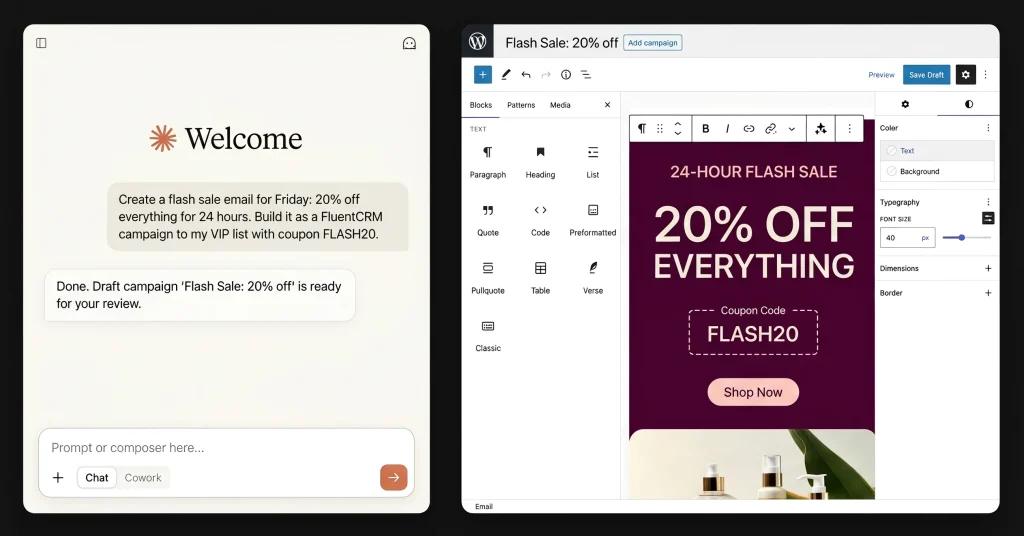
Let your AI assistant run your WordPress business. All-In-One MCP for Fluent Suite (fluentMCP) is a free MCP server that connects Claude, or any MCP client, to FluentCRM, FluentCart, Fluent Forms, FluentCommunity and WP Social Ninja, with 1,290 safe, named tools.
Free for a limited time · Open source · Nothing to install on your site
Claude Desktop extension
Get the extension
Free while it is in early release. Give us an email address and the download link lands in your inbox — no account, no card, nothing to install on your site.
We send the download and occasional release notes. Unsubscribe any time. MCP gives an AI assistant real access to your site — please read the safety notes before you connect it.

At a glance
1,290
REST endpoints, each its own tool
5
Fluent plugins behind one connector
203
risky operations gated behind confirm
0
plugins to install on your site
What is All-In-One MCP for Fluent Suite?
It is a Model Context Protocol (MCP) server for the WPManageNinja plugin suite. MCP is the open standard AI assistants use to call outside tools. Connect it once and your assistant can read and change the data in your Fluent plugins: contacts, campaigns, orders, subscriptions, coupons, forms, entries, community spaces, courses and reviews.
Every documented REST endpoint of each plugin becomes its own clearly named tool, such as crm_contacts_list, cart_orders_refund, forms_submissions_list and community_spaces_list. A built-in tool_map tells the assistant which tool it needs in one call.
It runs outside WordPress: as a Claude Desktop extension, a local Node process, or a Cloudflare Worker. It signs in with a WordPress Application Password, so every request runs with that user’s permissions. Plugins you don’t use are simply switched off. You can run it with just FluentCRM, or with all five.
Ask it things like
- “How did the store do this week versus last week?”
- “Find jane@example.com. What has she bought, and is she on the newsletter?”
- “Tag everyone who bought the spring course with
course-buyer.” - “Build me a 5-email welcome sequence for new subscribers, one email every two days, and tag them
welcomedwhen it ends.” - “Create a 24-hour flash sale: a 20% off coupon in FluentCart and a flash discount email to everyone who bought last year. Schedule it for Friday at 9am.”
- “Set up a win-back automation for customers who haven’t ordered in 90 days, with a 15% comeback coupon.”
- “Write a launch email for the new course and send a test to me first.”
- “Draft a campaign to the VIP list from the welcome template. Don’t send it.”
- “Order #1042 shipped today. Update its status.”
- “Preview when each email in sequence 12 will go out for someone who enrols Monday at 9am.”
Which Fluent plugins does it support?
Five WPManageNinja products today, free or Pro, with more on the way. Pro-only endpoints need the Pro plugin active; without it they simply return 404.
| Plugin | Tool prefix | Tools | What your assistant can manage |
|---|---|---|---|
| FluentCRM | crm_* | 366 | Contacts, companies, tags, lists, segments, campaigns, recurring campaigns, sequences, automations, templates, SMS, smart links, webhooks, AI writing, reports |
| FluentCart | cart_* | 436 | Products, variations, stock, orders, refunds, subscriptions, coupons, customers, tax, shipping, order bumps, software licensing, exports, PDF receipts, reports |
| Fluent Forms | forms_* | 91 | Forms, fields, entries, notes, statuses, confirmations, notifications, integration feeds, reports |
| FluentCommunity | community_* | 274 | Spaces, posts, comments, chat, courses, lessons, students, quizzes, profiles, paywalls, analytics |
| WP Social Ninja | social_* | 126 | Reviews, testimonials, review and feed templates, platform connections, chat widgets, sales notifications |
| Fluent Support | support_* | Coming soon | Tickets, customers, agents, workflows, saved replies, reports |
| FluentBooking | booking_* | Coming soon | Calendars, events, bookings, availability, hosts |
| FluentBoards | boards_* | Coming soon | Boards, stages, tasks, comments, members, time tracking |
| FluentAffiliate | affiliate_* | Coming soon | Affiliates, referrals, commissions, payouts |
| Paymattic | — | Planned | Payment forms, submissions, subscriptions, donors |
Plus built-in tools: tool_map (the index), verify_setup (checks your connection) and WordPress media upload, get and list.
Features
1
Complete coverage, not a curated subset
Every documented REST endpoint of each plugin, generated from the vendor’s own API reference and re-checked weekly. If the admin screen can do it, your assistant can too.
2
One map to find any tool
tool_map gives the whole surface at a glance, every tool in an area, or every tool matching a keyword, like “refund”. Responses are compact by default, with full records on request.
3
Partial updates can’t wipe your data
Fluent plugins treat updates as full replaces. Here, every update reads the record, merges your changes onto it, writes it, re-reads it and reports exactly what changed. A write the plugin silently ignored comes back as an error.
4
Nothing irreversible by accident
203 operations are marked destructive: deletes, refunds, cancels, bulk actions, mass sends and permission grants. They refuse to run without confirm: true. Twelve, like a full CRM wipe, are locked outright.
5
Preview any change first
dry_run on every write shows exactly what would be sent, and the diff, without touching anything. if_unmodified_since refuses a write if someone else changed the record first.
6
Runs where you work
Claude Desktop, Claude Code, Cursor and any MCP client. Host it once as a remote connector and it works in claude.ai on the web and on mobile too.
How do I install it?
Pick by where you use your assistant. All three take a few minutes.
A · Easiest
Claude Desktop extension
- Download the free
.mcpbfile. - In Claude Desktop, open Settings → Extensions and drag the file in.
- Enter your site URL, WordPress username and Application Password.
- Ask Claude: “Run verify_setup.”
B · Developers
Config file
- Clone the repo, then run
npm install && npm run build. - Copy
.env.exampleto.envand fill in your three credentials. - Add the server to Claude Code, Cursor or any MCP client config.
- Restart the client and run
verify_setup.
C · Web + mobile
Remote connector
- Deploy to Cloudflare Workers. The free tier is enough.
- Store your credentials and a random token as Worker secrets.
- In claude.ai, open Settings → Connectors → Add custom connector.
- Paste your Worker URL. Treat it like a password.
Full instructions, including Docker, Cloudflare Tunnel and GitHub Actions: README · Docs
Requirements
- A WordPress site running one or more of FluentCRM, FluentCart, Fluent Forms, FluentCommunity or WP Social Ninja (free or Pro).
- A WordPress admin (or plugin manager) user with an Application Password: WP Admin → Users → your user → Application Passwords. One password covers every plugin.
- For the config file and remote options: Node 20.6 or newer.
How does it compare to the native Fluent MCPs?
WPManageNinja ships its own MCP servers through FluentHub and Fluent Forms. They are good for the basics. This project covers what they leave out. Comparison as of September 2026. Check the vendor pages too, since their coverage grows.
| Native Fluent MCPs | All-In-One MCP for Fluent Suite | |
|---|---|---|
| Plugins | FluentCRM, FluentCart, Fluent Forms, Fluent Support, FluentBoards | FluentCRM, FluentCart, Fluent Forms, FluentCommunity, WP Social Ninja. Coming soon: Fluent Support, FluentBooking, FluentBoards, FluentAffiliate |
| Servers to connect | One per product | One connector, one credential |
| Tools | About 20–30 per product, hand-picked | 1,290: every documented REST endpoint |
| Writes | Selected actions | Everything the admin UI can do: settings, tax, shipping, templates, automations, licensing, courses and more |
| Partial updates | Tool-specific | Merge, verify and diff on every update |
| Safety | Preview-then-confirm on some sensitive actions | Confirm gates on 203 operations, 12 locked, dry run on every write |
| Runs | Inside WordPress (WordPress 6.9+) | Outside WordPress. Nothing installed on the site |
| Works in | Claude Desktop, Claude Code, Cursor, Codex | The same, plus claude.ai web and mobile |
| Price | Free with the plugins (some tools Pro) | Free for a limited time |
You don’t have to choose. Both use Application Passwords and can connect to the same site at the same time.
Pricing: free for a limited time
All-In-One MCP for Fluent Suite is free for a limited time. Right now there are no read-only limits, site caps or license keys: every tool, full read and write, on every site. Paid plans will follow, so download it while it is free.
Want to support the project? Buy your Fluent plugins through the links on this page (same price for you, a referral commission for the project), star the repo, or report what breaks on GitHub.
Everything included
$0
- All 1,290 tools across five plugins
- Full read and write
- Unlimited sites
- Desktop, local and remote installs
- Updates as the plugins’ APIs grow
FAQ
What is an MCP server?
MCP (Model Context Protocol) is an open standard that lets AI assistants like Claude call external tools. An MCP server exposes those tools. This one exposes your Fluent plugins, so your assistant can look things up and make changes for you.
Is All-In-One MCP for Fluent Suite free?
Yes, for a limited time. Right now you get every tool, full write access and unlimited sites at no cost. Paid plans will follow, and pricing will be announced on this page.
Which AI assistants does it work with?
Claude Desktop, Claude Code, Cursor and any other MCP client. As a remote connector it also works in claude.ai on the web and in the Claude mobile apps.
Does it work with the free versions of the Fluent plugins?
Yes. It uses the REST API each plugin already exposes. Pro-only features, such as FluentCart licensing or FluentCRM SMS, work when that Pro plugin is active.
Do I need all five plugins?
No. Plugins you don’t configure are switched off. It works with just FluentCRM, just FluentCart, or any combination.
Do I have to install anything on my WordPress site?
No. It runs outside WordPress and talks to your site’s REST API. You only create a WordPress Application Password.
Is it safe to let an AI change my store and CRM?
It is built for real operations. Updates merge instead of overwriting, every write is verified, and dry runs preview changes. Deletes, refunds and mass sends need explicit confirmation, and the most dangerous operations are locked. Keep your client set to ask before writes, use a dedicated WordPress user, keep backups, and test on staging first.
Where are my credentials stored?
Only where you run it: in Claude Desktop’s secure settings, your local .env file, or your own Cloudflare Worker secrets. The server stores nothing, and credentials never appear in logs or tool results.
What can I ask it to do?
Anything you would click through the admin for: sales reports, customer lookups, tagging contacts, drafting campaigns, building email sequences, updating orders, creating coupons, setting up courses and paywalls, moderating community posts, and managing reviews.
How is it different from FluentHub MCP?
FluentHub and the per-product native MCPs cover a hand-picked set of common actions, one server per product. This project covers every documented endpoint of five plugins behind one connector, with merge-and-verify writes and confirm gates applied to everything. You can use both.
Is it made by WPManageNinja?
No. It is an independent community project by upfluent.io. It is not affiliated with, endorsed by or supported by WPManageNinja.
How do I get help?
Open an issue on GitHub or email the support form.
Independent project. All-In-One MCP for Fluent Suite and upfluent.io are not associated with, endorsed by or supported by WPManageNinja. FluentCRM, FluentCart, Fluent Forms, FluentCommunity, WP Social Ninja and FluentHub are trademarks of their owners and are named here only to describe what this software connects to. Provided as is, without warranty, under the MIT license. Plugin links are affiliate links.
Your Fluent stack,
run by your AI.